




PHP实现ZIP流式打包下载(Zip on the fly)
最近做了个深度学习平台,遇到了一个问题:在图片服务器上将来会存储数以万计的图片资源,系统需求中要求这些图片应当能够导出。数以万计的图片单独地下载肯定不现实,需要打包,上网搜了一下,打包下载的代码很现成,甚至官方有ZipArchive这样的扩展。但是这里边有一个问题,ZipArchive虽然好,但是会遇到一个问题,就是需要将所有文件打包完后,才能输出到响应流中,这样在正式输出前会有一段明显的白屏卡顿阶段。于是考虑到使用流式打包下载。
对于流式打包下载(Zip on the fly)这种操作并不是首创,在GitHub的仓库打包下载为Zip中,就用到了这种技术。在下载前,服务器也不清楚到底仓库有多大,有多少文件,在下载的时候,服务器一边压缩,一遍向客户端输出压缩的结果,造成的效果就是浏览器立即开始下载,但是并没有显示进度或者最终文件的大小。流式下载除了解决大批量数据压缩过程中出现的明显延迟,还解决了大数据量压缩过程中对内存的消耗。在传统的先压缩后下载的方案中,压缩后的每一个文件的数据必须保存在内存中,这样将会消耗大量的内存空间,在另外一个流式下载的案例(Mybatis中使用流式查询避免数据量过大导致OOM)中,找到了这样一张图:
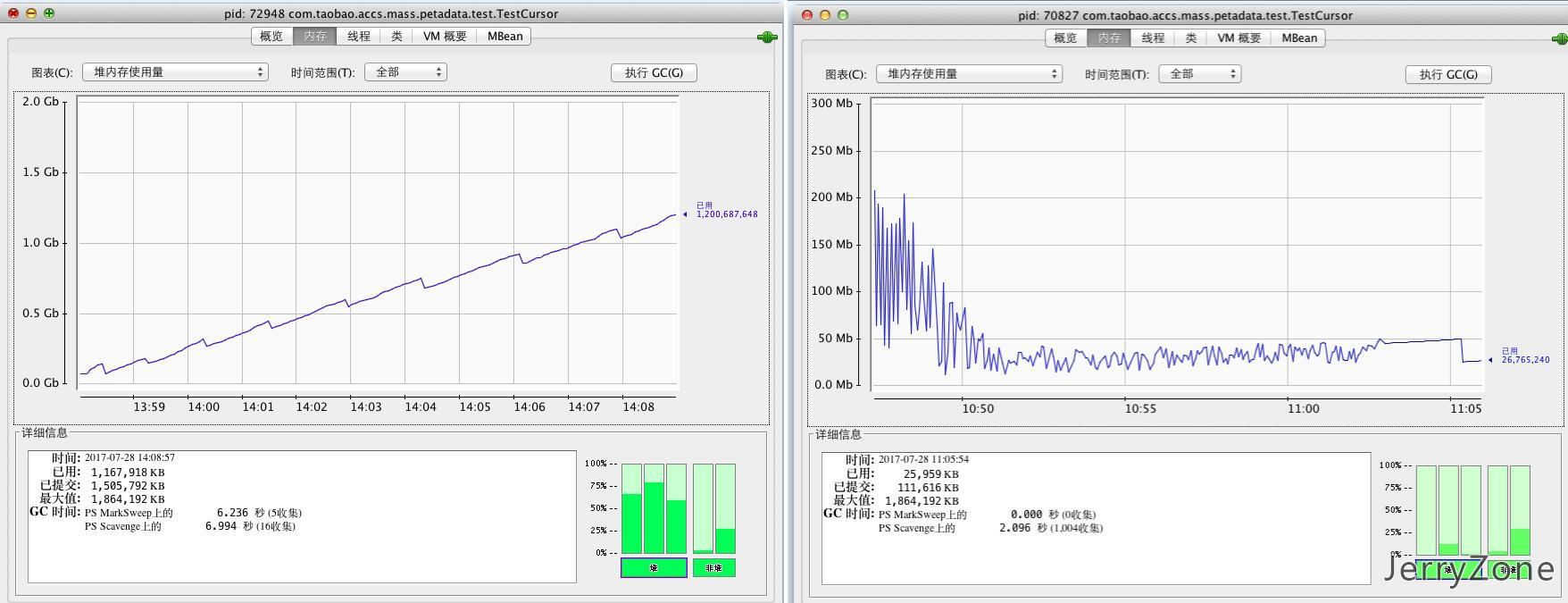
我们可以看到,在这样一个百万数据量的情况下,在不使用流式下载的情况下,内存一直飙升,最终耗掉了数GB的内存,这显然对于服务器端是不可接受的。当采用了流式输出,对于已经输出的内容不再保留,最终内存甚至不升反降,只消耗了数十MB的内存,资源的利用率有了明显的提升。
既然没有扩展能帮助我们完成这个工作,那就只能自行实现zip的算法了。不过天无绝人之路,在phpMyAdmin中有使用了一个类ZipFile,恰巧它还提供了一个流式输出的开关,那么我们就可以使用这个类来实现流式输出:
/**
 * Zip file creation class.
 * Makes zip files.
 *
 * @access  public
 * @package PhpMyAdmin
 * @see     Official ZIP file format: https://www.pkware.com/support/zip-app-note
 */
class ZipFile{
    /**
     * Whether to echo zip as it's built or return as string from -> file
     *
     * @var  boolean $doWrite
     */
    var $doWrite = false;
    /**
     * Array to store compressed data
     *
     * @var  array $datasec
     */
    var $datasec = array();
    /**
     * Central directory
     *
     * @var  array $ctrl_dir
     */
    var $ctrl_dir = array();
    /**
     * End of central directory record
     *
     * @var  string $eof_ctrl_dir
     */
    var $eof_ctrl_dir = "\x50\x4b\x05\x06\x00\x00\x00\x00";
    /**
     * Last offset position
     *
     * @var  integer $old_offset
     */
    var $old_offset = 0;
    /**
     * Comments
     *
     * @var string $comments
     */
    var $comments='';
    /**
     * Sets member variable this -> doWrite to true
     * - Should be called immediately after class instantiation
     * - If set to true, then ZIP archive are echo'ed to STDOUT as each
     *   file is added via this -> addfile(), and central directories are
     *   echoed to STDOUT on final call to this -> file().  Also,
     *   this -> file() returns an empty string so it is safe to issue a
     *   "echo $zipfile;" command
     *
     * @access public
     *
     * @return void
     */
    function setDoWrite()    {
        $this->doWrite = true;
    } // end of the 'setDoWrite()' method
    function setComments($comments){
        $this->comments=$comments;
    }

    /**
     * Converts an Unix timestamp to a four byte DOS date and time format (date
     * in high two bytes, time in low two bytes allowing magnitude comparison).
     *
     * @param integer $unixtime the current Unix timestamp
     *
     * @return integer the current date in a four byte DOS format
     *
     * @access private
     */
    function unix2DosTime($unixtime = 0)    {
        $timearray = ($unixtime == 0) ? getdate() : getdate($unixtime);

        if ($timearray['year'] < 1980) {
            $timearray['year'] = 1980;
            $timearray['mon'] = 1;
            $timearray['mday'] = 1;
            $timearray['hours'] = 0;
            $timearray['minutes'] = 0;
            $timearray['seconds'] = 0;
        } // end if

        return (($timearray['year'] - 1980) << 25)
            | ($timearray['mon'] << 21)
            | ($timearray['mday'] << 16)
            | ($timearray['hours'] << 11)
            | ($timearray['minutes'] << 5)
            | ($timearray['seconds'] >> 1);
    } // end of the 'unix2DosTime()' method

    /**
     * Adds "file" to archive
     *
     * @param string $data file contents
     * @param string $name name of the file in the archive (may contains the path)
     * @param integer $time the current timestamp
     *
     * @access public
     *
     * @return void
     */
    function addFile($data, $name, $time = 0){
        $name = str_replace('\\', '/', $name);

        $hexdtime = pack('V', $this->unix2DosTime($time));

        $fr = "\x50\x4b\x03\x04";
        $fr .= "\x14\x00";            // ver needed to extract
        $fr .= "\x00\x00";            // gen purpose bit flag
        $fr .= "\x08\x00";            // compression method
        $fr .= $hexdtime;             // last mod time and date

        // "local file header" segment
        $unc_len = strlen($data);
        $crc = crc32($data);
        $zdata = gzcompress($data);
        $zdata = substr(substr($zdata, 0, strlen($zdata) - 4), 2); // fix crc bug
        $c_len = strlen($zdata);
        $fr .= pack('V', $crc);             // crc32
        $fr .= pack('V', $c_len);           // compressed filesize
        $fr .= pack('V', $unc_len);         // uncompressed filesize
        $fr .= pack('v', strlen($name));    // length of filename
        $fr .= pack('v', 0);                // extra field length
        $fr .= $name;

        // "file data" segment
        $fr .= $zdata;

        // echo this entry on the fly, ...
        if ($this->doWrite) {
            echo $fr;
        } else {                     // ... OR add this entry to array
            $this->datasec[] = $fr;
        }

        // now add to central directory record
        $cdrec = "\x50\x4b\x01\x02";
        $cdrec .= "\x00\x00";                // version made by
        $cdrec .= "\x14\x00";                // version needed to extract
        $cdrec .= "\x00\x00";                // gen purpose bit flag
        $cdrec .= "\x08\x00";                // compression method
        $cdrec .= $hexdtime;                 // last mod time & date
        $cdrec .= pack('V', $crc);           // crc32
        $cdrec .= pack('V', $c_len);         // compressed filesize
        $cdrec .= pack('V', $unc_len);       // uncompressed filesize
        $cdrec .= pack('v', strlen($name)); // length of filename
        $cdrec .= pack('v', 0);             // extra field length
        $cdrec .= pack('v', 0);             // file comment length
        $cdrec .= pack('v', 0);             // disk number start
        $cdrec .= pack('v', 0);             // internal file attributes
        $cdrec .= pack('V', 32);            // external file attributes
        // - 'archive' bit set

        $cdrec .= pack('V', $this->old_offset); // relative offset of local header
        $this->old_offset += strlen($fr);

        $cdrec .= $name;

        // optional extra field, file comment goes here
        // save to central directory
        $this->ctrl_dir[] = $cdrec;
    } // end of the 'addFile()' method

    /**
     * Echo central dir if ->doWrite==true, else build string to return
     *
     * @return string  if ->doWrite {empty string} else the ZIP file contents
     *
     * @access public
     */
    function file(){
        $ctrldir = implode('', $this->ctrl_dir);
        $header = $ctrldir .
            $this->eof_ctrl_dir .
            pack('v', sizeof($this->ctrl_dir)) . //total #of entries "on this disk"
            pack('v', sizeof($this->ctrl_dir)) . //total #of entries overall
            pack('V', strlen($ctrldir)) .          //size of central dir
            pack('V', $this->old_offset) .       //offset to start of central dir
            pack('v',strlen($this->comments)).//.zip file comment length
            $this->comments;

        if ($this->doWrite) { // Send central directory & end ctrl dir to STDOUT
            echo $header;

            return "";            // Return empty string
        } else {                  // Return entire ZIP archive as string
            $data = implode('', $this->datasec);

            return $data . $header;
        }
    } // end of the 'file()' method
} // end of the 'PMA\libraries\ZipFile' class
上面的代码与原版略有更改。原版不支持为最终的zip文件添加注释,通过使用010Editor和相关文档的说明,我添加了对注释的支持。当我们需要执行流式下载时,可以使用下边的代码:
<?php
include_once("ZipFile.php");
header("Content-Disposition: attachment; filename=文件名.zip");
//创建生成器
$zip=new ZipFile();
//开启流式压缩
$zip->setDoWrite();
//遍历数据
foreach ($datas as $data){
    //添加文件
    //这里需要注意一下,如果文件名或者注释中涉及中文,那么要注意字符串保存使用的编码不是GBK时要改为GBK
    //(对于字符串常量就是php文档的编码,数据库中得到的数据就是数据库的编码等等)
    $zip->addFile($data,iconv("utf-8","gbk",'文件名'));
    //感谢1135192606@qq.com提醒,对于output_buffering为On的场景,需要手动调用ob_flush()防止输出数据堆积在PHP输出缓存中
    ob_flush();
    //每次调用完压缩算法把输出缓存挤出去
    flush();
}
//设置注释,此处可以省略
$zip->setComments(iconv("utf-8","gbk","一些注释"));
//输出文件尾部
$zip->file();
Hi,Jerry:
你的网盘http://disk.jerryzone.cn用的是什么代码或者CMS实现呢? 能否分享下。
emmmm这个disk.jerryzone.cn是我自己基于七牛云用php写的,里边功能很简单就是一个列表然后显示每个bucket的内容,说叫网盘,实际上就是个我自己用来维护CDN资源的一个比较容易到达的终端罢了,只不过另外建了几个bucket能简单当当网盘用罢了.至于源码,暂时没有开源的打算.
您好,我有部分数据较大,想把这个写成一个接口下供他人调用:假如这个接口返回的是ZIP的流是由:a.xml和b.xml二个文件组成的ZIP组成。。。接收方是需要将这个ZIP的流先生成出来一个ZIP文件,再去解压拿到里面的数据,,还是可以不用生成ZIP包,直接拿到我的数据流(因为这个流本身就是个ZIP)就可以直接解压拿到里面的文件呢?求指教
ob_flush();//在flush();前加上这句,不然的话占用内存比ZipArchive更大。
抱歉,太久没维护博客了,挖个坟.ob_flush()这个清理的是PHP的缓冲区,大小是由php.ini中output_buffer设置(默认4KB),当缓存空间满后会自动调用ob_flush().对于这个output_buffer有三种值,on/off/整数.设置为On表示开启缓存并且不限制缓存大小,这种情况下需要手动调用ob_flush()使得缓冲区的内容输出;设置为Off表示关闭缓冲区,即输出的内容立刻输出至客户端,相当于echo后立刻调用ob_flush();设置为整数表示开启缓存但缓存区限制为整数大小(字节),当缓冲区满后自动调用ob_flush().所以比较保守的写法是加上ob_flush(),防止output_buffering被改成了On,但是大多数默认配置场景下不加ob_flush()也不会造成什么问题.这里我决定还是参考您的建议加上这行.